

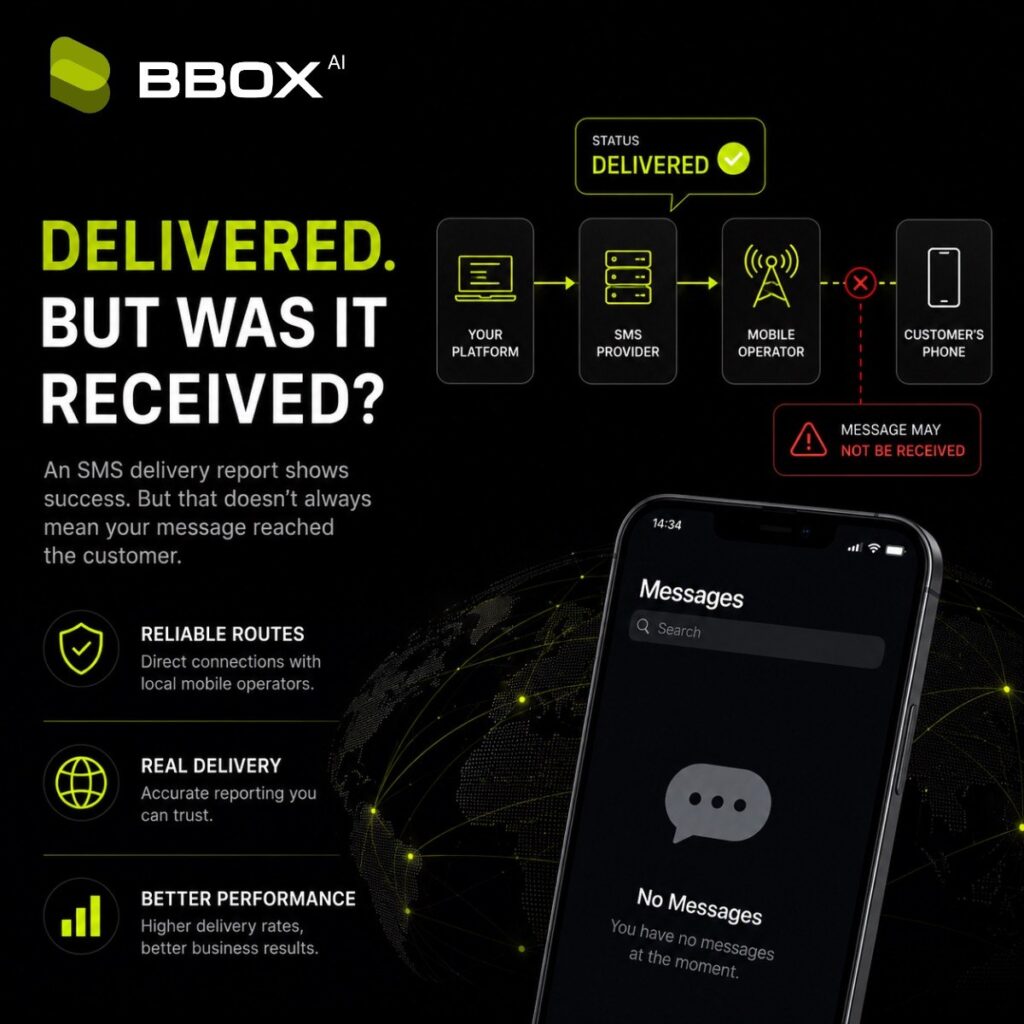
Your SMS platform shows a 97% delivery rate. Everything looks good.
Then customers start saying that they did not receive the message.
This happens more often than many companies expect. The report says Delivered, but the SMS is not visible on the customer’s phone.
At first, it looks impossible. Either the message was delivered or it was not. SMS delivery is not always that simple. The main problem is that the word Delivered can mean different things depending on the mobile operator, country, SMS route and provider.
A delivery report is useful. But it should not be treated as final proof that the customer received, opened or even saw the message.
What Does “SMS Delivered” Actually Mean?
When you send an SMS, it does not usually travel directly from your system to the customer’s phone.
The message may pass through several systems:
Your website, application or CRM
Your SMS provider
One or more intermediary providers
The mobile operator
The customer’s mobile phone
During this process, the systems exchange status updates.
The final status update is usually called a Delivery Report or DLR.
A DLR tells your platform what happened to the message. Common SMS delivery statuses include:
Sent
Delivered
Pending
Failed
Rejected
Expired
Undelivered
The problem is that the Delivered status may be generated at different points in the delivery chain.
Some delivery reports are returned when the mobile operator accepts the message. Others are returned only after the message reaches the customer’s handset.
These are not the same thing.
Vonage, for example, separates delivery receipts into carrier-level and handset-level receipts. It also states that not every delivery report guarantees that the target handset received the message.
Carrier Delivery vs Handset Delivery
There are two main types of SMS delivery confirmation.
Carrier delivery report
A carrier delivery report confirms that the message was accepted by a telecommunications provider or mobile operator. This means the message successfully reached one stage of the delivery chain. It does not always mean that the message appeared on the customer’s phone.
Handset delivery report
A handset delivery report is generated after the message reaches the customer’s mobile device. This is a stronger confirmation of real delivery. However, not every mobile operator provides handset-level delivery reports. The type and quality of delivery reporting can also differ between countries and networks. Some platforms therefore display Delivered after receiving confirmation from the carrier, even when direct handset confirmation is not available. Twilio describes SMS delivery statuses as tentative and notes that Delivered may indicate that the carrier accepted the SMS. This is why two SMS providers can use the same status name while reporting different stages of the delivery process.
Why Does an SMS Say Delivered but Is Not Received?
There is no single reason. Several things can cause this situation.
1. The mobile operator accepted the message
The provider may receive a successful DLR when the destination operator accepts the SMS. From the provider’s point of view, the message was delivered to the operator. But the operator may still need to deliver it to the customer’s device. If the phone is switched off, outside coverage or temporarily unavailable, the operator may store the message and try again later. The dashboard can therefore show Delivered before the customer actually sees the SMS.
2. The route returns a carrier-level DLR
Some SMS routes provide only carrier-level confirmation. The message may have reached an intermediary provider or mobile operator, but there is no final confirmation from the handset. This is not necessarily fraud or a technical failure. It may simply be a limitation of the destination network. The important point is that the SMS provider should understand what type of delivery report is available for that destination.
3. The delivery report is inaccurate
Sometimes the downstream provider returns a successful status even though the message was not delivered to the handset.
This is commonly known as a fake DLR.
A fake DLR makes the report look better than the real delivery result.
Infobip lists “Delivered status but the end user does not receive the SMS” as one of the symptoms of a fake delivery report. It also notes that such cases may increase when low-cost aggregator routes are used.
4. The phone filters or blocks the message
The message may reach the device but not appear in the main SMS inbox.
Possible reasons include:
The sender is blocked
The message is placed in a spam folder
The phone’s security software filters it
The device applies its own message classification
The user previously marked similar messages as spam
In this case, the mobile network may consider the SMS delivered even though the customer does not notice it.
5. There is a delay
SMS is usually fast, but it is not guaranteed to be instant.
Delivery can be delayed because of:
Mobile network congestion
Temporary operator problems
An unavailable handset
Routing between multiple providers
Operator retry periods
Problems with the delivery report webhook
A message can remain Pending for some time and then change to Delivered or Expired. When testing an SMS route, it is important to record both the final status and the delivery time. For an OTP message, delivery after ten minutes is technically a delivery. Commercially, it is useless.
6. The test number is the problem
Many SMS delivery investigations start with one test number.
That is rarely enough.
The number may be:
Inactive
Recently ported to another operator
Roaming
Blocked for certain sender types
Used too often for testing
Part of a provider’s internal test system
Running spam-filtering software
If one number does not receive the message, this does not prove that the entire SMS route is broken.
At the same time, a successful test to one number does not prove that the route works across the whole country.
What Is a Fake DLR?
A fake DLR is a delivery report that shows a successful SMS delivery without reliable confirmation that the message reached the customer’s handset.
In simple terms:
The platform reports delivery, but the message was not really delivered.
Fake DLRs can appear for several reasons.
A downstream provider may return a success status too early. An intermediary may not have access to handset-level reports. A low-quality route may generate delivery statuses that do not match the real result.
In some cases, part of the traffic may not be delivered at all, while successful DLRs are still returned.
This can make an SMS route look cheap and effective when it is neither.
A low price per SMS means very little if part of the traffic never reaches real users.
Does Delivered Mean That the Customer Read the SMS?
No.
SMS does not normally provide a Read status.
A Delivered status is not the same as:
The customer opened the message
The customer read the text
The customer clicked the link
The customer entered the OTP
The customer completed a purchase or registration
Read receipts are available in some messaging applications, such as WhatsApp, but standard SMS reporting usually ends with Delivered or Undelivered.
This is why delivery rate should not be your only performance metric.
Why Delivery Rate Alone Can Be Misleading
Imagine that you send 100,000 SMS messages.
Your provider reports:
96,000 Delivered
2,000 Pending
2,000 Undelivered
The delivery rate looks excellent.
But your normal campaign generates 4,000 clicks, while this campaign generates only 900.
Or your normal OTP completion rate is 75%, but it suddenly falls to 38%.
The DLR report says that everything is fine.
The customer behaviour says that something is wrong.
This difference should not be ignored.
A high reported delivery rate combined with a sharp fall in clicks, registrations, deposits or OTP confirmations may indicate a route-quality problem.
It is not automatic proof of fake DLRs. Content, timing, audience quality and technical issues can also affect conversion.
But it is a strong reason to investigate.
How to Check Real SMS Delivery
The best way to evaluate SMS delivery is to compare technical reporting with real results.
Test several mobile networks
Do not test only one number.
Use active numbers from the main mobile operators in the destination country.
A route may work perfectly on one network and fail on another.
Use real handsets
Whenever possible, test with physical phones and normal active SIM cards.
Provider test tools are useful, but they do not always reproduce real mobile network conditions.
Record the exact delivery time
For every test, record:
Send time
Time of the Delivered DLR
Time the SMS appeared on the phone
Mobile operator
Sender ID
Message text
Message ID
Destination number
This makes it easier to identify delays and inconsistencies.
Compare the DLR with the handset
A simple test table can look like this:
Mobile network | DLR status | Received on phone | Delivery time |
Operator A | Delivered | Yes | 4 seconds |
Operator B | Delivered | No | Not received |
Operator C | Pending | Yes | 12 seconds |
Operator D | Delivered | Yes | 46 seconds |
This gives you more useful information than a delivery percentage alone.
Track the action after delivery
For OTP traffic, track:
OTP request rate
SMS Delivered rate
OTP completion rate
Average time to enter the code
Resend requests
For promotional SMS, track:
Delivered rate
Click rate
Conversion rate
Unsubscribe rate
Customer complaints
The final business action is often a better quality signal than the DLR itself.
Warning Signs of SMS Delivery Problems
One unusual message is not enough to judge a route.
Look for repeated patterns.
Possible warning signs include:
Delivered status, but several real users receive nothing
Very high DLR rates combined with unusually low conversions
Delivered reports arriving almost instantly for every message
Identical DLR timing across large volumes
Problems limited to one operator or country
A high number of messages remaining Pending
Sender ID changes without explanation
Links or parts of the message being removed
A route working for OTP but failing for promotional traffic
A provider refusing to share message logs or investigate examples
The more detailed your samples are, the easier it is to find the real cause.
Saying “SMS does not work in this country” is not enough.
A useful investigation needs destination numbers, send times, message IDs, sender IDs, operators and message text.
How to Compare Two SMS Providers Properly
Do not compare SMS providers only by price or reported delivery rate.
Run the same traffic through both providers under similar conditions.
Use:
The same country
The same mobile operators
The same sender ID
The same message text
Similar sending times
Similar recipient groups
Then compare:
Reported delivery rate
Real handset delivery
Delivery speed
OTP completion or click rate
Error codes
Customer complaints
Cost per successful action
A provider charging €0.03 per SMS may be more expensive than a provider charging €0.04.
But if the second provider delivers more messages and produces more completed actions, its real cost may be lower.
The cheapest SMS is not the one with the lowest price.
It is the one that reaches the user and produces the expected result.
What Should You Ask Your SMS Provider?
When delivery results do not match your reports, ask direct questions:
Is this a direct or aggregator route?
Is the DLR generated by the handset, mobile operator or intermediary?
Are DLRs reliable for this country and operator?
Is the sender ID registered?
Is this route suitable for OTP, transactional or promotional traffic?
Are there content or URL restrictions?
Can you provide operator-level delivery statistics?
Can you check specific message IDs?
Can we test another route?
A serious provider should not promise perfect delivery everywhere.
Mobile messaging has too many networks, regulations and technical differences for that promise to be honest.
A better answer is a clear explanation of what is known, what is not known and what can be tested.
The Main Point
An SMS delivery report is important, but it is only one part of the picture.
Delivered may mean that the message reached the handset.
It may also mean that the message was accepted by a carrier or another provider in the delivery chain.
And in some cases, the delivery report may simply be inaccurate.
This is why SMS quality should be measured using several signals:
Delivery reports
Real handset tests
Delivery time
OTP completion
Clicks and conversions
Customer feedback
When the dashboard says Delivered but customers say otherwise, do not argue with the customers.
Check the route.
Frequently Asked Questions
Why does my SMS say Delivered when it was not received?
The Delivered status may confirm that the message was accepted by a mobile operator rather than received by the handset. Device filtering, delivery delays, route problems and inaccurate DLRs can also cause this situation.
What is an SMS delivery report?
An SMS delivery report, also called a DLR, is a status update generated during the delivery process. It may show whether the message was sent, delivered, rejected, expired or not delivered.
What is a fake DLR?
A fake DLR is a delivery report that shows a successful delivery without reliable confirmation that the SMS reached the customer’s phone.
Does SMS Delivered mean Read?
No. Standard SMS does not normally provide a Read status. Delivered does not confirm that the customer opened or read the message.
How can I test SMS delivery?
Use several real mobile numbers across different operators. Compare the DLR status with actual handset receipt, delivery speed and actions such as OTP completion or link clicks.
How long should SMS delivery take?
Most SMS messages arrive within seconds, but delays are possible because of network congestion, unavailable handsets, routing issues or operator retry periods. For time-sensitive messages such as OTPs, delivery speed should be measured separately from the final delivery rate.
Can a cheap SMS route return fake DLRs?
It can happen, especially with low-quality multi-hop or aggregator routes. However, a low price alone does not prove that a route is bad. The route should be tested using real handsets, several networks and business conversion data.
What information is needed to investigate an SMS delivery problem?
Prepare the destination number, mobile operator, send time, sender ID, message text, message ID, DLR status and confirmation of whether the SMS reached the handset. Several examples are better than one.